How to Remove Location and Hidden Data (EXIF) From Photos
· 1 min read
Every phone photo carries hidden information called EXIF: date and time, phone model, camera settings and often the exact GPS location where it was taken. Send a photo taken at home, and your address can be read from it. Here's how to check and remove it.
Step 1. Open the photo
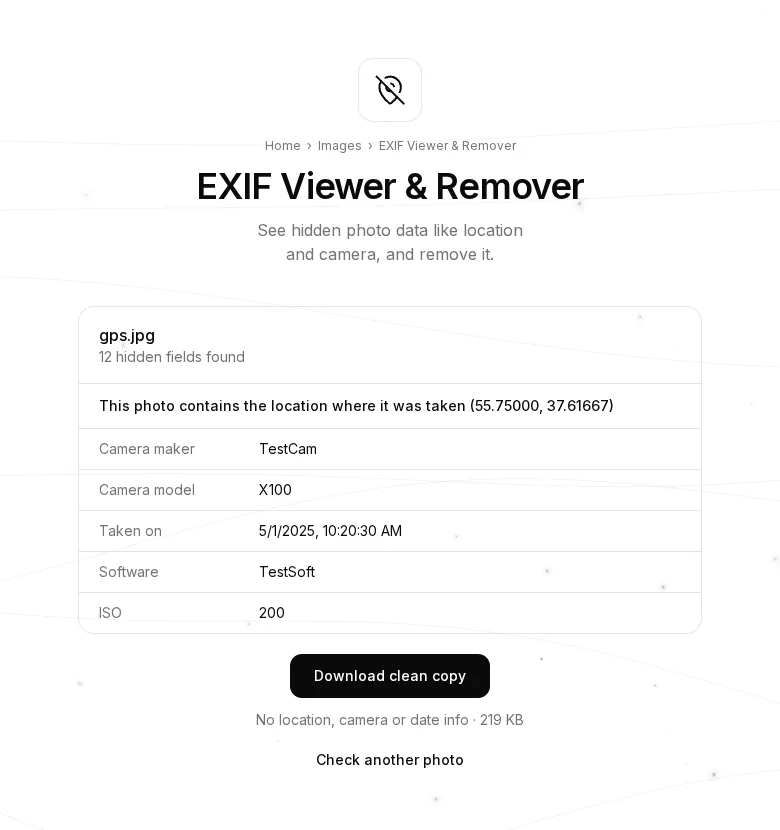
Open the EXIF Viewer & Remover and choose a photo.
Step 2. See what's inside
The tool lists every field it finds. If the photo contains a location, a warning with the coordinates appears at the top. Below are the camera maker and model, the date taken, software, ISO and other settings.
Step 3. Download a clean copy
Press “Download clean copy”. The line under the button tells you what's removed: location, camera and date. For JPG and PNG the picture itself stays exactly the same, with no re-compression; only the hidden data goes.
When it's useful
- Before posting photos on social media, forums or marketplaces.
- Before sending photos to strangers (selling things, renting a flat).
- When sharing work photos where the phone model and date are nobody's business.
Tips
- Messengers often strip EXIF themselves, but email, cloud links and “send as file” don't.
- To stop your phone recording the location at all, turn off location tags in the camera settings.
- Your photo is never uploaded: checking and cleaning happen in your browser.