How to Merge PDF Files Into One — Free and Private
· 1 min read
Need to send a contract, its attachments and a scanned ID as one file? Or put homework together from several PDFs? You can merge them in a minute right in your browser.
Step 1. Add your files
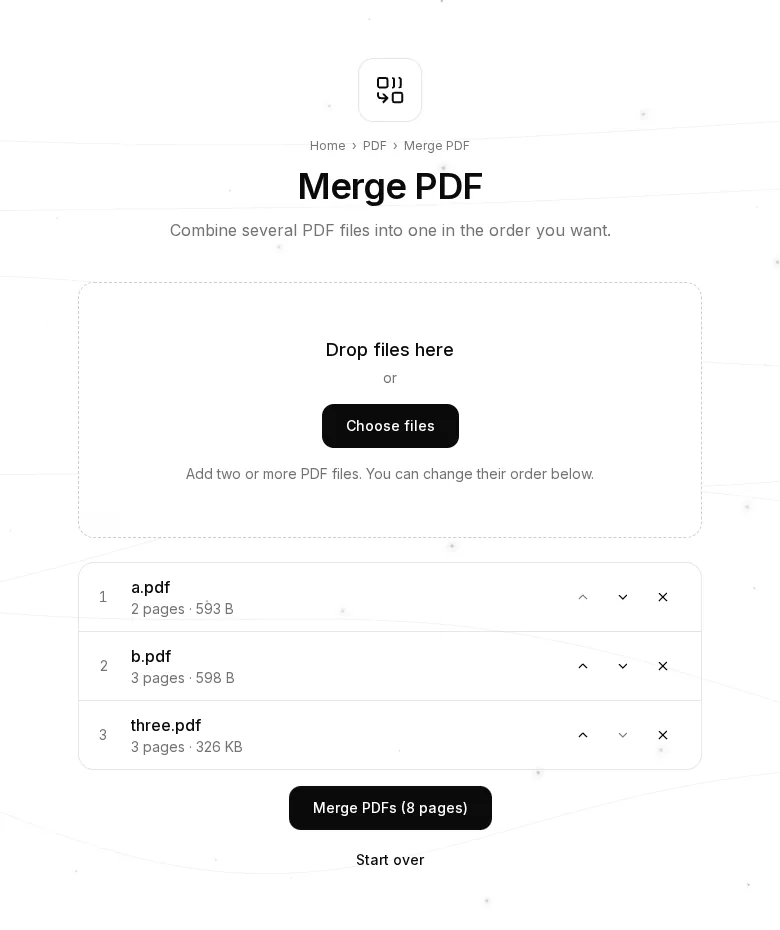
Open Merge PDF and drag two or more PDF files into the box, or press “Choose files”. Each file appears in the list with its page count and size.
Step 2. Put them in order
Use the ▲ and ▼ arrows to move files up and down: the final document is built from top to bottom. The cross removes a file.
Step 3. Merge and download
Press “Merge PDFs” — the button shows how many pages you'll get. One combined PDF downloads.
What else you can do
- Remove pages or reorder them inside a document — Delete & Reorder Pages.
- Split a PDF back into parts — Split PDF.
- If the merged file is too big for email — Compress PDF.
- Turn photos or scans into a PDF — JPG to PDF.
Tips
- A password-protected PDF has to be opened and saved without the password first.
- There's no hard limit on the number of files; very large documents only depend on your computer's memory.
- Your documents are never uploaded: merging happens in your browser.